Tuesday, March 5, 2019

Directory entry says what? Current Gopher type field types

Ready to dig into the details of the modern Gopher ecosystem?  

The Gopher network protocol is like the precursor to modern HTML web browsers. Like HTML, a Gopher client could display links and text, download files, and display images. Unlike HTML, a Gopher client is using very spare, without the opportunity to display colorful, interactive displays. 

A typical Gopher screen is a directory, a menu-like list of lines, each of which does one thing. A line might display some text, or be a link to a file to view or download, or an image, or might be  a link to another Gopher directory, possibly on another server.  
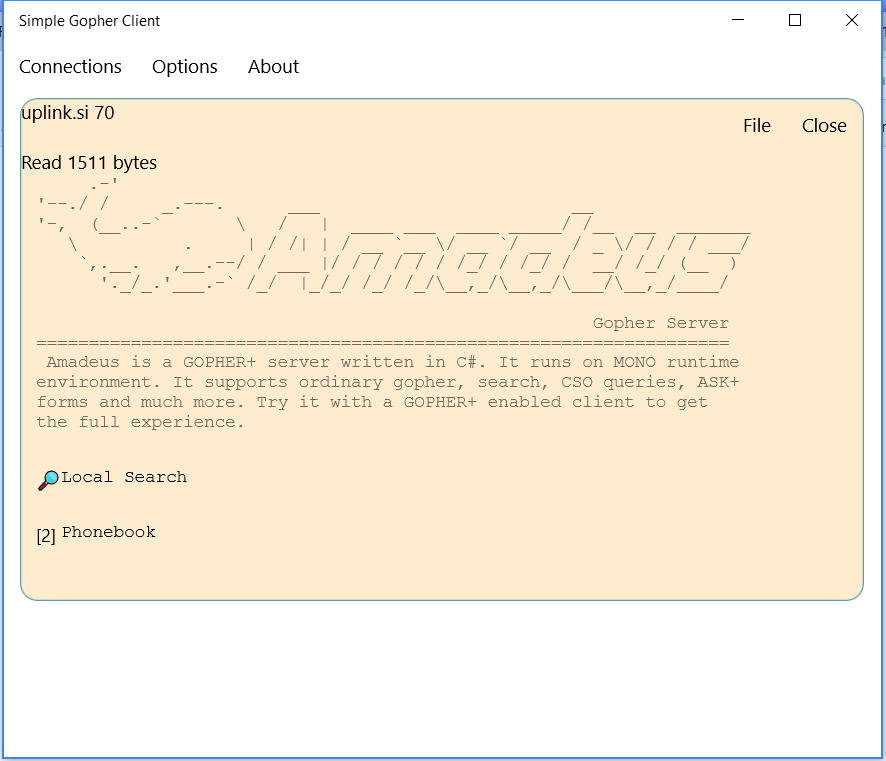
The Amadeus Gopher Server, served up by my own Simple Gopher Client

I started looking more into modern Gopher sites and how they actually work when creating my own Simple Gopher Client for the Window Store.

 The Gopher RFC 1436 lists 14 different directory entry type fields, each of which is given a single letter identifier. 0, for example, means that the entry refers to a text file that can be displayed; 1 stands for a link to another gopher server. The 'g' type field is for a GIF file and 'I' is for an image type (but the type isn't explicitly given). Uniquely, directory entries can point to other protocols: '8' for a Telnet server, '2' for a particular phone-lookup protocol, '7' for a search engine, and 'T' for an IBM 3270-style terminal connection. 

Over the years other type fields have been informally added to the list. I recently did a crawl of the Gopher space as it exists in February, 2019 to see what kinds of directory entry type fields are in current usage across the current Gopher space. 

Many Gopher files are served up using generic descriptions and not the more precise descriptions. Type 9, "Binary file" is the most common, followed by type 'd', document (a modern addition that's not part of the official Gopher spec). These two account for 87% of the non-image files served up by Gopher. The third most common type is type 5, DOS Binary, followed by BinHex, PDF and UUEncoded. 


Something similar happens with picture image formats. The 'I' generic image field type is used about 30x more often than the more specific 'g' GIF field type. 


Looking at the most popular field types, the 0=file, i=information and 1=directory are the top three field types by far, accounting for about 90% of the field types. 


Some of the original field types are hardly present. The "T" type field that indicated a IBM TN3270 style interaction is entirely missing. The type field '2' CSO Phone book lookup is present on just a 4 pages total, but most of them seem to be samples of what a CSO phone book would be like, not a real phone book. There are actual field type '3' error pages, and no surprise, they seem to result from correctly handling errors from the scripts that generate some Gopher pages. There are also no Duplicate Server '+' type field entries. 


 (Note: I removed from the numbers pages that are test pages whose purpose is to validate Gopher clients) 

Type Fields (Alphabetical order) 
I'll finish this blog post with a handy table of existing Gopher tag types. Every tag that was found at least 10 times, or is part of the official RFC, is listed here 

Field 
Count 
Type 
Status 
; 
11 
Video 

+ 
0 
Duplicated Server 
RFC 
0 
60976 
File 
RFC 
1 
29335 
Directory 
RFC 
2 
5 
CSO Phone 
RFC 
3 
36 
Error 
RFC 
4 
223 
File (BinHex) 
RFC 
5 
631 
File (DOS Binary) 
RFC 
6 
3 
File (UUEncoded) 
RFC 
7 
257 
Index-search server (Veronica) 
RFC 
8 
479 
Telnet 
RFC 
9 
4799 
File (binary) 
RFC 
D 
12 
Some kind of binary file? 

d 
1590 
File (document) 

g 
102 
Image (gif) 
RFC 
H 
4 


h 
3914 
HTML Link 

I 
3300 
Image 
RFC 
i 
13216 
Information 

M 
115 
Mail file? 

P 
26 
PDF File 

p 
15 
Image (PNG) 

s 
278 
Sound 

T 
0 
IBM TN3270 
RFC 
w 
9 
Wiki edit link 
Field 
Count 
Type 
Status 
; 
11 
Video 

+ 
0 
Duplicated Server 
RFC 
0 
60976 
File 
RFC 
1 
29335 
Directory 
RFC 
2 
5 
CSO Phone 
RFC 
3 
36 
Error 
RFC 
4 
223 
File (BinHex) 
RFC 
5 
631 
File (DOS Binary) 
RFC 
6 
3 
File (UUEncoded) 
RFC 
7 
257 
Index-search server (Veronica) 
RFC 
8 
479 
Telnet 
RFC 
9 
4799 
File (binary) 
RFC 
D 
12 
Some kind of binary file? 

d 
1590 
File (document) 

g 
102 
Image (gif) 
RFC 
H 
4 


h 
3914 
HTML Link 

I 
3300 
Image 
RFC 
i 
13216 
Information 

M 
115 
Mail file? 

P 
26 
PDF File 

p 
15 
Image (PNG) 

s 
278 
Sound 

T 
0 
IBM TN3270 
RFC 
w 
9 
Wiki edit link 
Field 
Count 
Type 
Status 
; 
11 
Video 

+ 
0 
Duplicated Server 
RFC 
0 
60976 
File 
RFC 
1 
29335 
Directory 
RFC 
2 
5 
CSO Phone 
RFC 
3 
36 
Error 
RFC 
4 
223 
File (BinHex) 
RFC 
5 
631 
File (DOS Binary) 
RFC 
6 
3 
File (UUEncoded) 
RFC 
7 
257 
Index-search server (Veronica) 
RFC 
8 
479 
Telnet 
RFC 
9 
4799 
File (binary) 
RFC 
D 
12 
Some kind of binary file? 

d 
1590 
File (document) 

g 
102 
Image (gif) 
RFC 
H 
4 


h 
3914 
HTML Link 

I 
3300 
Image 
RFC 
i 
13216 
Information 

M 
115 
Mail file? 

P 
26 
PDF File 

p 
15 
Image (PNG) 

s 
278 
Sound 

T 
0 
IBM TN3270 
RFC 
w 
9 
Wiki edit link 
  
Field 
Count 
Type 
Status 
; 
11 
Video 

+ 
0 
Duplicated Server 
RFC 
0 
60976 
File 
RFC 
1 
29335 
Directory 
RFC 
2 
5 
CSO Phone 
RFC 
3 
36 
Error 
RFC 
4 
223 
File (BinHex) 
RFC 
5 
631 
File (DOS Binary) 
RFC 
6 
3 
File (UUEncoded) 
RFC 
7 
257 
Index-search server (Veronica) 
RFC 
8 
479 
Telnet 
RFC 
9 
4799 
File (binary) 
RFC 
D 
12 
Some kind of binary file? 

d 
1590 
File (document) 

g 
102 
Image (gif) 
RFC 
H 
4 


h 
3914 
HTML Link 

I 
3300 
Image 
RFC 
i 
13216 
Information 

M 
115 
Mail file? 

P 
26 
PDF File 

p 
15 
Image (PNG) 

s 
278 
Sound 

T 
0 
IBM TN3270 
RFC 
w 
9 
Wiki edit link 
  
Field
Count
Type
Status
;
11
Video

+
0
Duplicated Server
RFC
0
60976
File
RFC
1
29335
Directory
RFC
2
5
CSO Phone
RFC
3
36
Error
RFC
4
223
File (BinHex)
RFC
5
631
File (DOS Binary)
RFC
6
3
File (UUEncoded)
RFC
7
257
Index-search server (Veronica)
RFC
8
479
Telnet
RFC
9
4799
File (binary)
RFC
D
12
Some kind of binary file?

d
1590
File (document)

g
102
Image (gif)
RFC
H
4


h
3914
HTML Link

I
3300
Image
RFC
i
13216
Information

M
115
Mail file?

P
26
PDF File

p
15
Image (PNG)

s
278
Sound

T
0
IBM TN3270
RFC
w
9
Wiki edit link


Thursday, January 17, 2019

First lessons learned: Magnetometers!

Magnetometers -- how do they work?
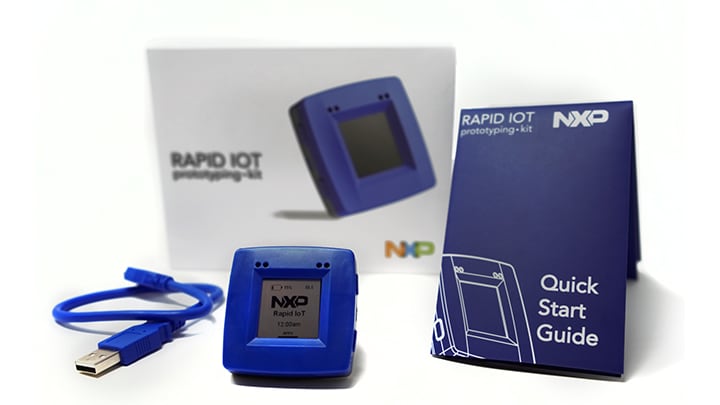
I'm having fun with an NXP Rapid IOT kit as part of a Hackster.io contest. This is the first time I've really tried to deal with a magnetometer and how to convert the seemingly random output into something that can be used for a compass. Here's what I've learned!
NXP Rapid IoT Prototyping Kit

You have to calibrate your code to match the magnetometer values. I simply looked at the range of X and Y values as I rotated the IOT kit (range in this case meaning to grab the highest and lowest values). This gives you a midpoint for the X and Y values.

Calculate an adjusted X and Y: Xadjust = (Xmidpoint - Xraw) where the values have the obvious meaning. I suppose a better adjustment would also divide by the overall range so that the X and Y values are also normalized, but so far I haven't needed to do that.

Calculate an angle with the always handy atan2(x, y) function. You might remember from trigonometry class that the tangent of an angle is equal to the opposite side of the triangle divided by the adjacent side. If you know opposite/adjacent, then you automatically know the tangent of the angle, and by using the arc-tangent, can get the original angle back. In computers, we use atan2 and provide the X and Y (aka, adjacent and opposite) values directly; otherwise, there would be a divide-by-zero problem when the adjacent is zero (aka, when pointing magnetic north/south)

In computers we always get the angle in radians; multiply by 180/3.1416 to get the angle in degrees. No, that value for PI is a little off, but take a look at the results you get; they jitter by several degree no matter what.

But then there was a big discovery: my laptop has magnets that really, really interfere with the readings! This isn't helped by the short USB cable provided!

TL/DR: compass heading is atan2 (xadjust, yadjust) where the adjusted values are relative to the actual midpoint that you measure. You have to do the measure locally; it's not a globally-valid amount all over the world. The phrase "all over the world" includes "especially near a modern laptop with magnets"

Fun historical fact: iron ships included "deviascopes" to adjust the magnetic compass and to offset the residual magnetism left over from building the ship. A ship's magnetic field will potentially change every time the ship goes in for servicing (and on battleships, every time the big guns are moved!)